
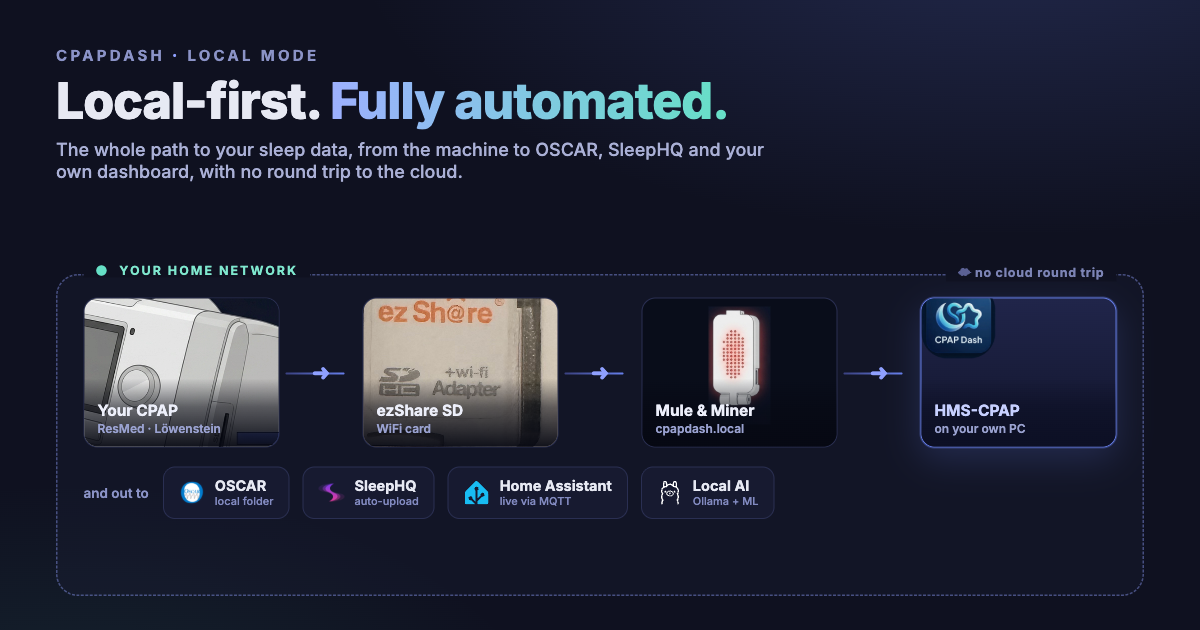
The core idea behind CpapDash is that the data is yours. You should be able to pull it off your own machine and do whatever you want with it, in whatever tool you like. That belief is the thing the whole platform is built around.
So the Mule and Miner ships with two modes. There is cloud mode, the convenient one: it sends your nights up to your private profile on cpapdash.com and they are on your phone in the morning. And there is local mode, which keeps everything on your own network and never phones anything home.
This whole project actually started as the local one. Before there was a cloud, before there was an app, it was a home-lab build for me. The data lived three feet away from where I slept, served straight onto my own network, with no round trip out to some server and back. The cloud and the app came later, and I built them for convenience, for people who just want it to work and do not want to run anything themselves. Both are first class. But if you have a PC or a laptop at home and you like owning your stack, the all-local path is right here, and it is one of the very few ways to get data off a CPAP and onto your network automatically.
Here is how it works.
Local mode turns your data into a website
The Mule and Miner has a mode I literally call local mode, because that is exactly what it does. It takes the ezShare SD card sitting in your machine and exposes it on your home WiFi as a plain website. You turn it on in the bridge's own setup page: open Advanced and choose Home network.
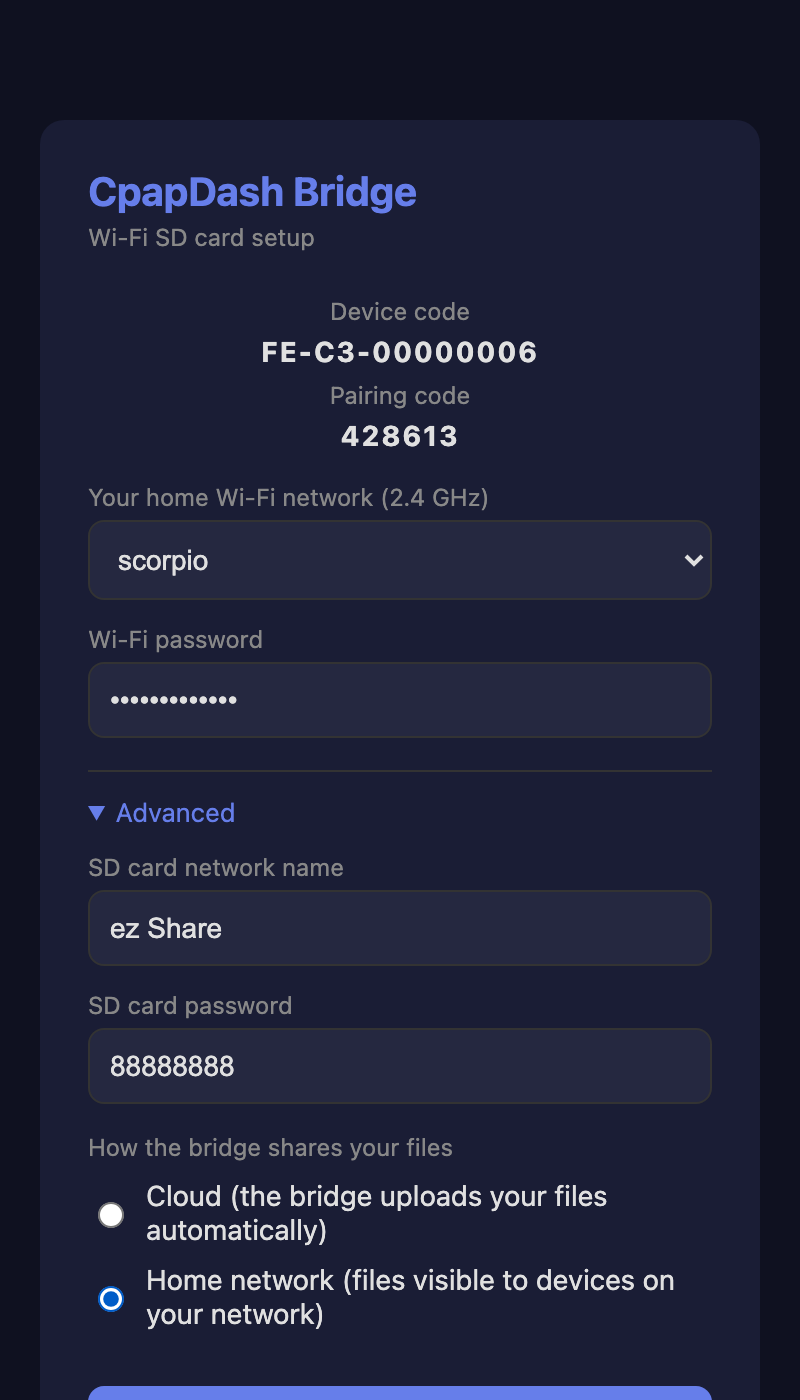
From then on you open a browser, type cpapdash.local, and your card is right there.
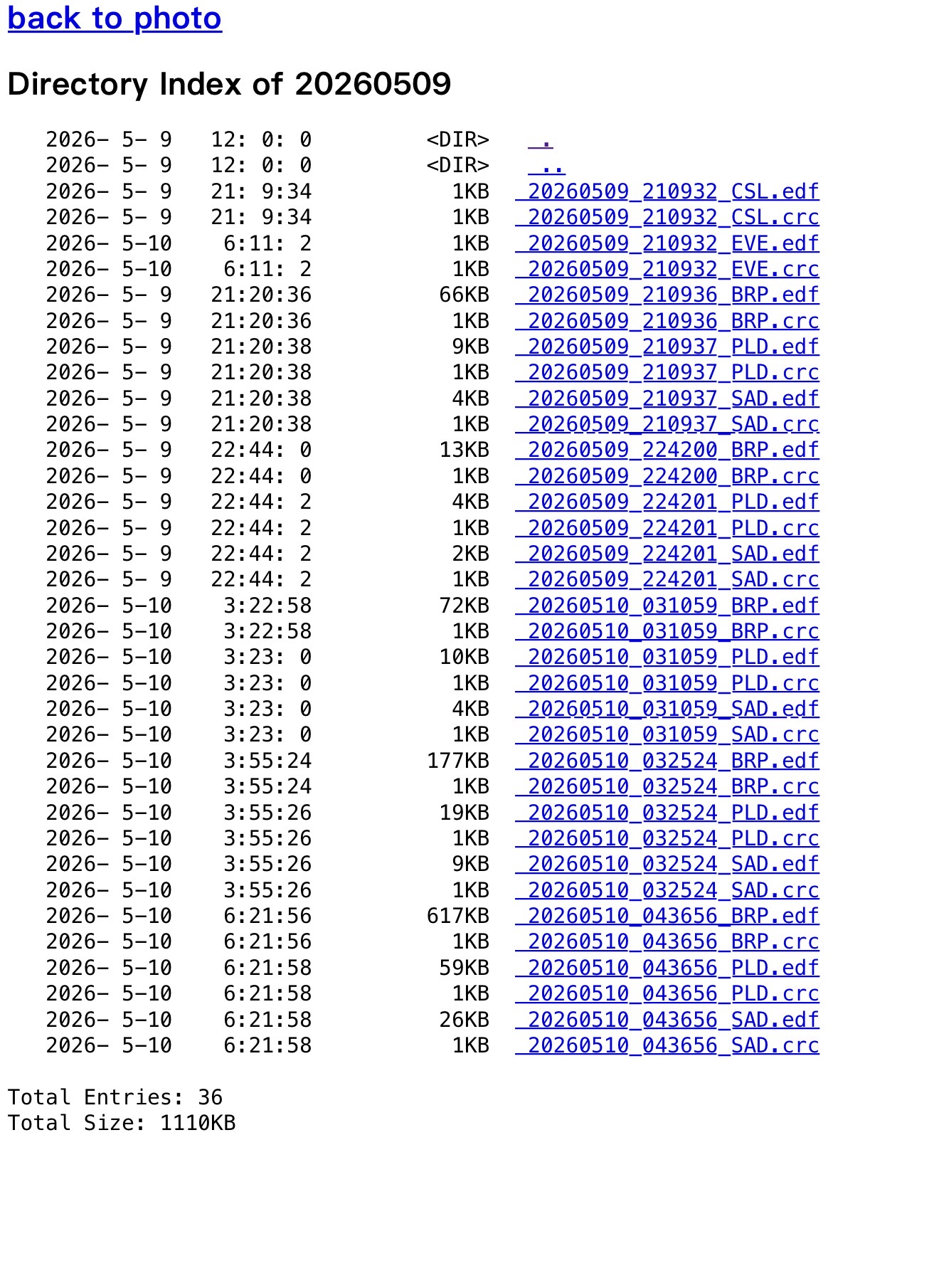
That is the raw stuff, straight off the card: the BRP, PLD, SAD and EVE files your ResMed writes every night. No account, no cloud, no login. Just your data, on your network, as files you can grab.
Feed OSCAR, or a shared folder
Once your data is a website on your LAN, you have options, and a bunch of them do not even involve me.
There are plenty of projects on GitHub that do nothing but bridge an ezShare card to wherever you want it. You can have one of them pull the files down automatically and drop them into the folder OSCAR watches, so OSCAR always has last night ready when you open it. You can push them into an SMB share (a Samba folder, a network drive, whatever your NAS calls it) and let everything in the house reach them.
If that is your thing, go for it. Your data, your call. I wrote a whole separate walkthrough on the OSCAR-specific setup in What if you just want your data in OSCAR?, if that is all you are after.
Or run the app I built for myself
The other option is the one I reach for: HMS-CPAP.
It is the tiny C++ app I wrote in the first place, back when this was just my own problem to solve. It connects to the Mule and Miner, parses your ResMed data in real time, and gives you your whole night charted and trended in a dashboard. It is small, it is fast, and it runs entirely on your own machine. You can grab it from my org at hms-homelab/hms-cpap.
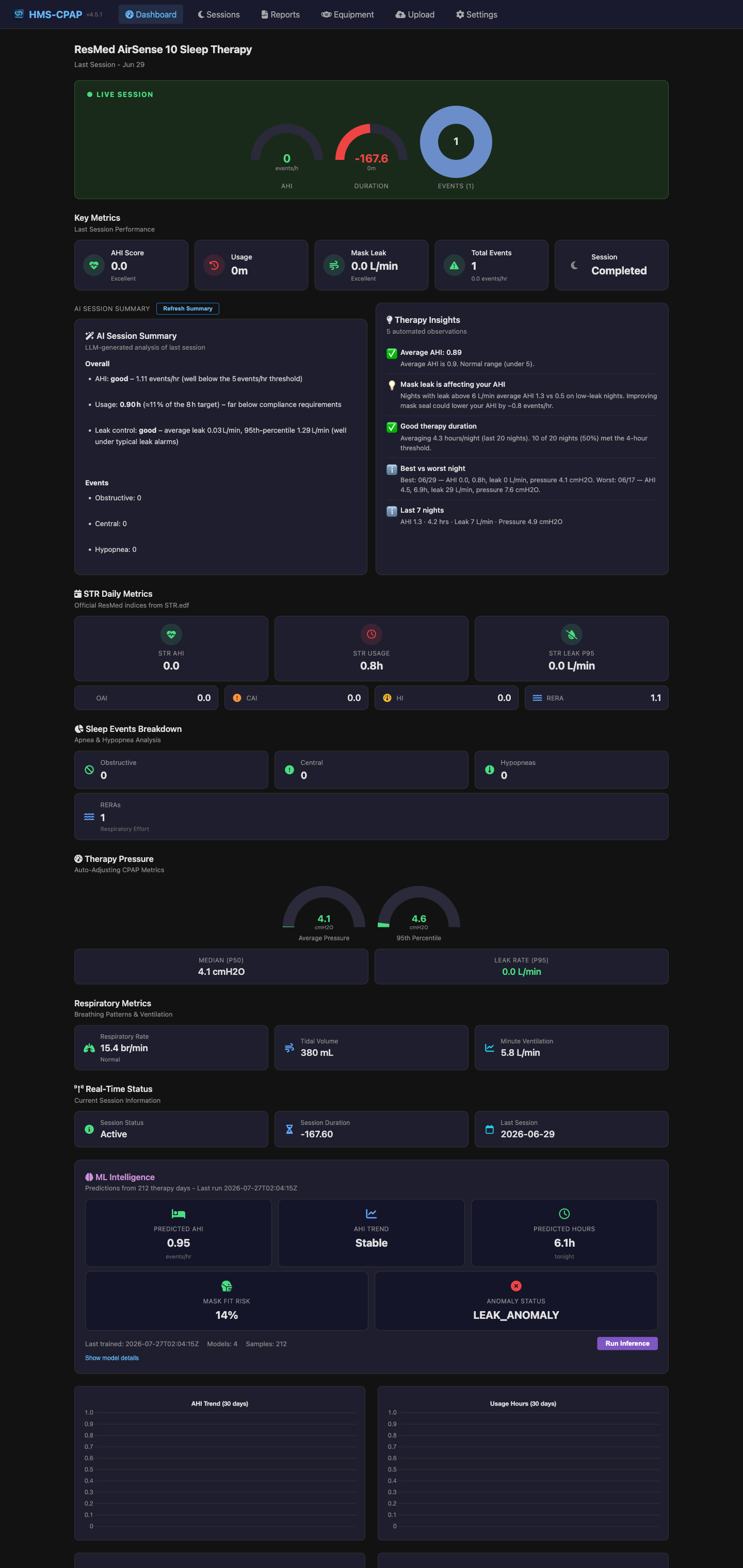
And it is not a stripped-down thing. It has grown most of the features the cloud has. Plain-English insights about your night. Daily summaries that actually tell you what happened while you slept. Every respiratory event charted. Your AHI, your pressures, your leak. It even mirrors the equipment and supplies side of the cloud, so your replacement schedules and cleaning reminders can live here too.
The wizard: point it at your data, pick a folder, done
I built a proper setup wizard for it, because nobody should have to hand-edit a config file just to look at their own sleep. You open the app, it opens a browser, and it walks you through a handful of steps.
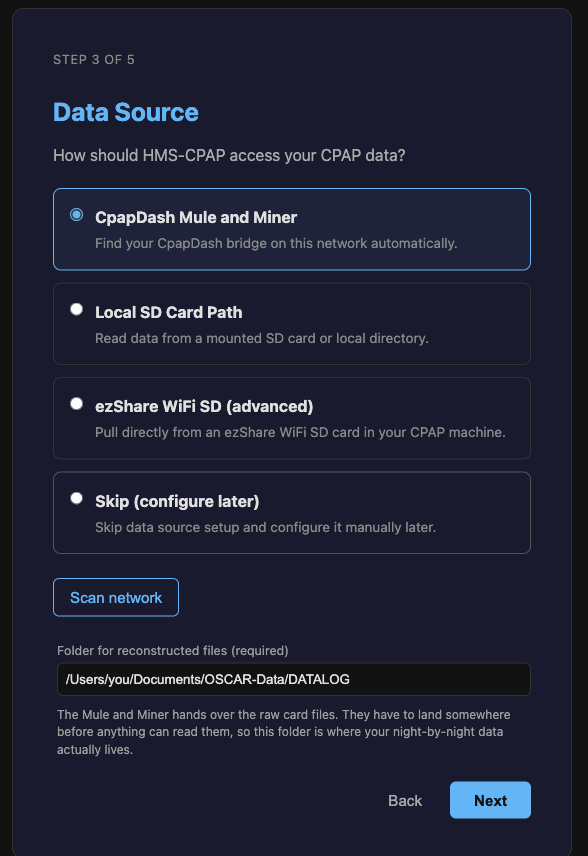
The important part is really two fields. First, where your data comes from. If you have a Mule and Miner, you point it at your bridge (it can find it on the network for you) and it connects and starts downloading on its own. Second, where you want the data kept. This one matters if you are an OSCAR user, because you can point it straight at the folder OSCAR reads, so both apps are looking at the exact same files.
Set those two, hit save, and you land on your dashboard with last night already on its way down.
Everything else is a checkbox
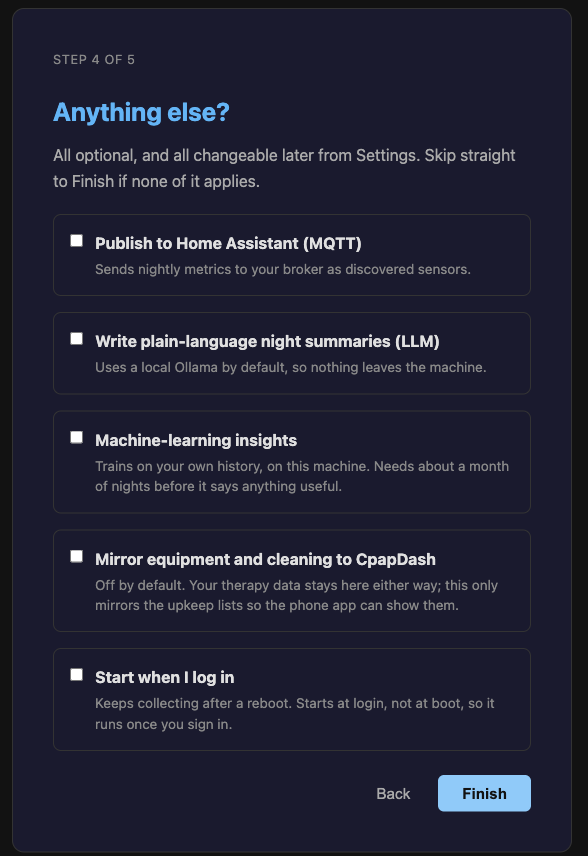
Everything past those two fields is optional, and all of it is built to stay on your machine.
Turn on local night summaries and it writes you a plain-language recap of each night using an Ollama model on your own box, so nothing leaves the house. (If you would rather point it at a bigger frontier model, you can, but the default keeps it home.)
Turn on machine-learning insights and it starts training a model on your own history, right there on your machine. Give it about a month of nights and it starts predicting, spotting trends and patterns in your data, and flagging the bad ones before you would have caught them yourself.
Turn on Home Assistant and this is where the home-lab side really shows up. Hand it your MQTT broker and HMS-CPAP publishes everything into Home Assistant as proper discovered sensors. Your therapy lands on your HA dashboard in real time: a live banner when a session starts, the session filling in as you sleep, all of it, sitting right next to your lights and your thermostat.
No Mule and Miner? Still works
The app does not actually care where the data comes from. If you already have a folder on your PC that gets updated some other way, point HMS-CPAP at it and you are done. Pull the card out and copy the files by hand if you want, it will read those too.
And if you have a PC that can reach both the ezShare card's WiFi and your home network at the same time (which is how I ran it at the very beginning), you can skip the bridge entirely. HMS-CPAP will connect straight to the ezShare card, pull the night off it, and copy it onto your own network. No Mule and Miner in the middle at all.
The bonus: stay local and still feed SleepHQ
Here is the part I like. Going all-local does not mean cutting yourself off from the tools you already use.
Even with everything running on your own machine, you can connect your SleepHQ profile, paste in your API credentials once, and HMS-CPAP uploads each night to SleepHQ automatically. The session closes in the morning, it goes up on its own, you do nothing. So you get the private local stack and your data waiting in SleepHQ, at the same time.
That is the whole thing
A complete CPAP setup that lives entirely on your own network, updates itself every night, charts and summarizes your sleep, learns from your history, lights up Home Assistant, and still feeds OSCAR and SleepHQ whenever you want them. All local, all automated, all yours, in real time.
That is what I wanted to show you today.